How do I check my company's state compliance status?
State compliance status is a summary of whether your company is in good standing in every state where it's registered — no missing documents, no overdue filings, no lapsed registrations. For a company registered in only one state, checking this is straightforward but for a company registered in several, it means one state could have a missing document while another has an overdue filing, and there's no way to know that without checking each one individually.
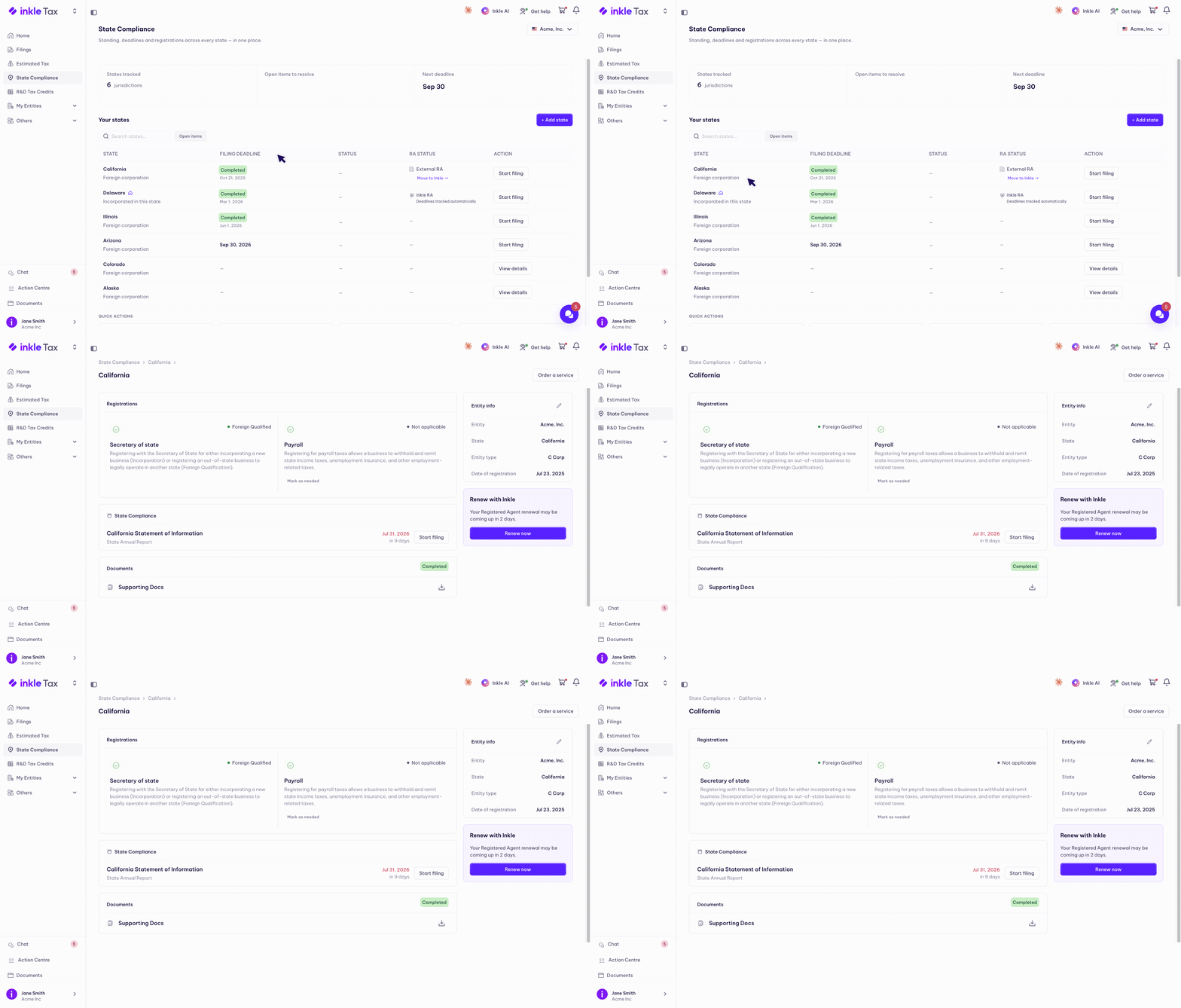
On Inkle Tax, this is what the State Compliance dashboard is built for — a single view of every state at once, and a full breakdown for any one of them when you need it.
Your standing at a glance
The dashboard's three tiles summarise the selected entity the moment you open the page:
- States tracked: how many jurisdictions are in view
- Open items to resolve: your most useful signal, e.g. "4 items need attention across 4 states." When this reads 0, nothing is waiting on you
- Next deadline: the most urgent filing, with a File now shortcut. If it's already past, it shows how many days overdue
In the Your states table, the Status column flags any state marked Missing info (Inkle is waiting on a detail from you), and the Filing deadline column flags anything Overdue in red. Use the Open items filter to narrow the table to just the states that need attention. Standing is tracked separately for each entity. Switch entities using the selector at the top right to check another company.
Open a state for the full picture
Select any state to open that state's page. At the top, a banner shows that state's most urgent deadline: amber when it's approaching (due Jul 31, 2026, 3 days left) or red when it's passed (overdue by 148 days), with a File now shortcut.
Registrations: is each part set up?
The Registrations section shows the status of each registration Inkle tracks for that state, each with a colour-coded label:
- Secretary of State: green when it's in order (Foreign Qualified, or Registered Agent · Incorporated for your home state); red when action is needed (Foreign Qualification required)
- Payroll: green when you're registered, red Not registered when you aren't, or grey Not applicable if it doesn't apply
A green check means that registration needs nothing from you. A red icon means action is needed, and the card shows Register (Inkle sets it up for you) and Already registered? (enter your existing details) right there. If a registration genuinely doesn't apply, you can mark it not applicable to stop Inkle expecting it, and switch it back later.
State Compliance: filings and deadlines
Below Registrations, the State Compliance section lists that state's filings, a State Annual Report, Statement of Information, or Delaware Franchise Tax, for example, each with its due date, a status (Overdue in red, or a countdown like "in 3 days"), and a Start filing button.
Missing information
When Inkle needs a specific detail before it can track or file something, a Missing information card appears on the right listing exactly what's needed, for instance an SOS Number, with an Add info button. Open the state, add what's listed, and the status clears.
Entity info and documents
The Entity info card shows the entity, state, entity type, and registration or incorporation date for that state. Select the pencil to edit it. The Documents section holds that state's paperwork, Certificate of Incorporation, supporting docs, and so on, each with a download icon. To request work for a state, use Order a service at the top right.
FAQ
What does "Missing info" mean on a state's status?
It means Inkle needs a specific detail from you, like an SOS Number, before it can track or file for that state. The Missing information card on the state's page tells you exactly what's needed.
Why does a registration show as "Not applicable"?
Some registrations, like payroll, don't apply to every state you're registered in. You can mark a registration as not applicable if it genuinely doesn't apply, and switch it back later if that changes.
Does compliance status update in real time?
Yes. As soon as a filing is completed or a missing detail is added, the status on both the dashboard and the state's page updates to reflect it.
Can I check the status of a specific state without going through the full dashboard?
Yes. Select any state from the Your states table to open its individual page, which shows its full compliance picture on its own.
Still have questions?
Reach out to our support team if you have any additional questions regarding filing.