What you need to provide for your Form 1120
Form 1120 is the annual federal tax return filed by all US companies taxed as a C-Corporation. It reports your company's income, deductions, credits, and tax liability for the year to the IRS. If your US corporation existed at any point during the tax year, you are required to file, even if the company had zero revenue or was dormant for the year.
Once you launch your Form 1120 filing on Inkle, a licensed tax professional will handle the preparation and submission on your behalf. Your job is to provide accurate information and documents so the team can file correctly and on time.
This article walks you through everything you need to have ready.
Who needs to file Form 1120
You need to file Form 1120 if you had a US C-Corporation that was in existence during the tax year, or if you have an LLC that elected to be taxed as a C-Corp. This includes companies that:
- Were incorporated but had not yet started operations
- Had zero revenue or expenses for the year
- Were dissolved partway through the year
- Are foreign-owned (e.g. an India-US flip structure with a Delaware C-Corp)
For example: If you incorporated on December 31, 2025, are a calendar-year company, and had no operations, financial activity, or bank accounts, you still need to file a Form 1120 for 2025.
Note: For most companies, the tax year follows the calendar year (January 1 – December 31). If your company elected a different fiscal year-end during your EIN application, your deadlines will differ accordingly.
What's included in your Form 1120 filing on Inkle
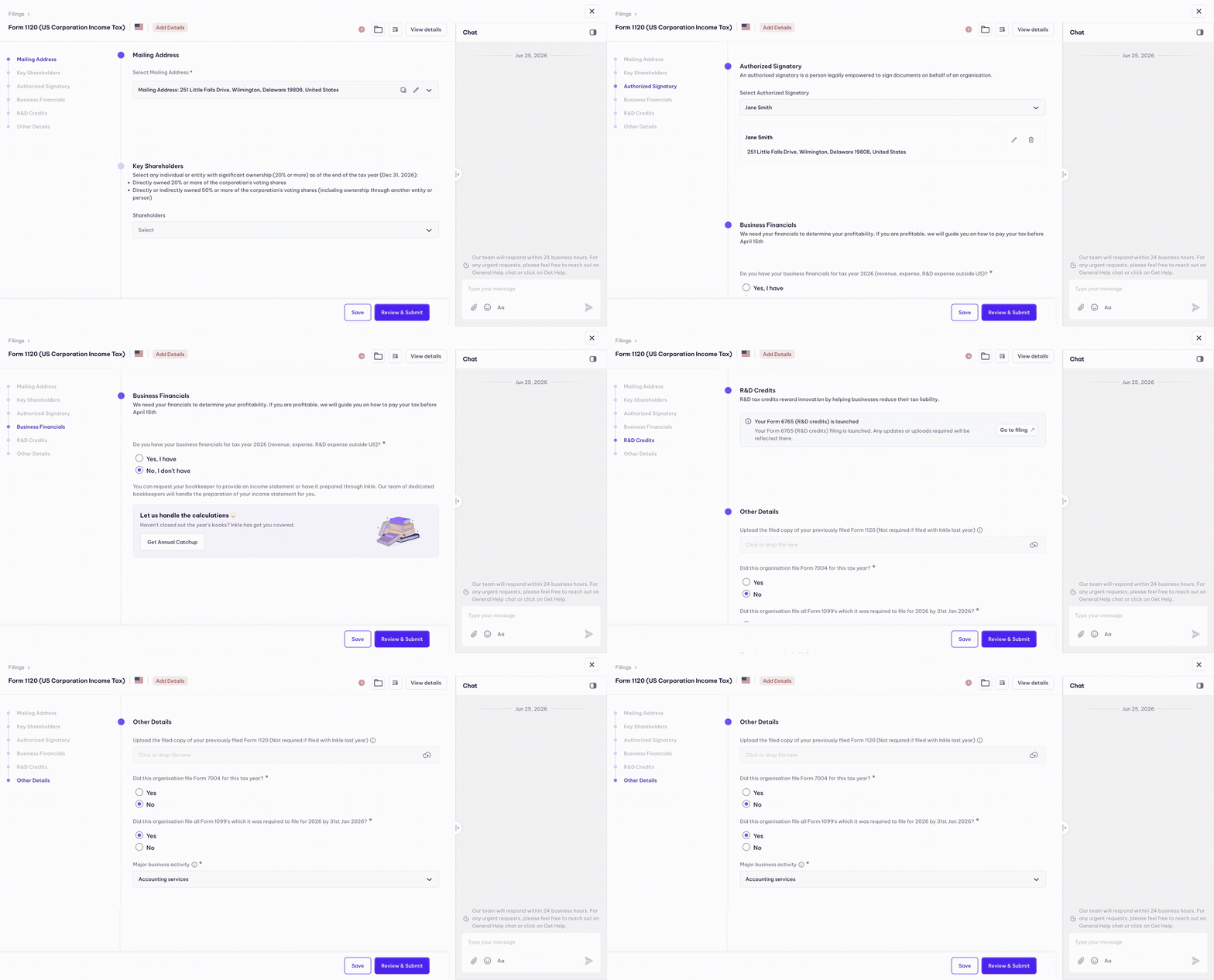
When you launch Form 1120 on Inkle, your filing includes:
- Preparation of your US Corporate Tax Return (Form 1120) by a licensed tax professional
- Review of your financial data for accuracy and completeness
- Any applicable schedules attached to Form 1120 based on your entity structure
- E-filing with the IRS once you review and approve
What you need to provide
1. Financial Statements
The primary document the Inkle tax team needs to prepare your return is your financial statements for the full tax year. These give the tax team a complete picture of your company's income, expenses, and overall financial position.
You will need to provide the following:
- Profit and Loss Statement (P&L) - A summary of your company's revenue and expenses for the tax year (January 1 to December 31)
- Balance Sheet - A snapshot of your company's assets, liabilities, and equity as of December 31 of the tax year
If your company had revenue during the tax year, you will also need to provide a bifurcation of that revenue by:
- State - A breakdown of how much revenue was earned in each US state where your company has customers or operations. This is used to determine your state-level tax and filing obligations
- Country - A breakdown of how much revenue came from US customers versus international customers. This is required for certain IRS schedules and helps determine whether any foreign income reporting applies to your company
2. Mailing address
Your Form 1120 requires a US mailing address. This is the address the IRS will use to send any notices, correspondence, or refund checks related to your filing.
Important rules for your mailing address:
- It must be a valid, active US address.
- It cannot be an international address (e.g. an India address will not be accepted by the IRS for a US corporate return).
- It must be an address where your company can reliably receive mail. IRS notices sent to an inactive or incorrect address are your company's legal responsibility, even if you never received them.
- If you recently changed your address, request us to start the address change process with IRS by filing Form 8822-B and make sure the updated address is reflected in your entity profile on Inkle before launching the filing.
If your company does not have a physical US office, ensure you use a US Virtual Mailroom. Inkle's Virtual Mailroom service provides a US address that is suitable for IRS correspondence. We will scan all letters you receive on this address and upload it to your Inkle Dashboard.
3. Authorized signatory
Form 1120 must be signed by a person who is legally authorized to sign on behalf of the corporation. The IRS requires a valid signature, as an unsigned return is treated as if it were never filed.
Who qualifies as an authorized signatory:
- The President, Vice President, Treasurer, CFO, CEO or any CXO of the corporation
- Any other corporate officer or director authorized by the company's board to sign tax returns
What to keep in mind:
- The signatory does not need to be a US resident or US citizen; a foreign founder who holds an authorized officer role qualifies
- The signatory's name, title, and contact details must match what is recorded in your entity's Directors & Officers section on Inkle
- Make sure your Officers section in Inkle Tax is filled in correctly before the filing reaches the review stage — the tax team pulls this information when preparing the return
4. Business activity description
Your Form 1120 requires a description of your company's principal business activity — what your company primarily does to generate revenue.
Examples:
- SaaS software subscriptions
- Technology consulting services
- E-commerce retail
This also maps to your NAICS code (a 6-digit industry classification number). If you haven't added your business activity and NAICS code to your entity profile yet, do this before launching the filing. Misclassification can create issues with state filings and IRS records.
5. EIN (Employer Identification Number)
Your federal EIN must be on file in your entity profile. This is the tax ID the IRS uses to identify your corporation — every form filed with the IRS references it.
If you have your EIN letter (Form SS-4), upload it to My Entities → select your entity → Documents.
If you have lost your EIN letter, you can request a Letter 147C from the IRS by calling them directly. You will need a fax number to receive it. Once you receive the Letter 147C, upload that to your Documents section in place of the SS-4.
6. Entity documents
The following documents help the tax team verify your entity details and prepare accurate schedules:
- Certificate of Incorporation: Confirms your formation date, state of incorporation, and legal entity name
- EIN Letter (Form SS-4): Confirms your federal tax ID
- Cap Table or Shareholder details: Required to determine ownership structure, which affects certain schedules on Form 1120
- W-8BEN-E or W-9 (if applicable): Relevant if your company has withholding obligations or foreign ownership
- Any other State registration letters.
Upload these once to your entity's Documents section in Inkle and they'll be available for all future filings, you won't need to re-upload every year.
7. Additional information for Foreign-Owned C-Corps
If your US C-Corporation is owned (25% or more) by a foreign person or entity, for example, an Indian founder (who is not a US resident) or an Indian company or LLP — the following additional considerations apply:
- Form 5472 will likely be filed alongside your Form 1120, reporting reportable transactions between the US corporation and its foreign owner.
- Your ownership percentage must be accurately recorded in the Shareholders section of your entity profile.
- Make sure your cap table is fully updated in Inkle Tax. The Inkle tax team refers directly to your cap table to verify ownership percentages and identify who qualifies as a foreign owner. An incomplete or outdated cap table can delay your filing or result in incorrect reporting.
- If your US C-Corporation owns 10% or more of a foreign company, for example an Indian private limited company, you are required to file Form 5471. This form reports your US company's interest in the foreign entity and details of that entity's financials.
- Your foreign ownership percentages and subsidiary relationships must be accurately recorded in your entity profile on Inkle Tax.
Go to My Entities → select your entity → Overview to verify this.
This is one of the most commonly missed compliance requirements for India-US founders. The Inkle tax team handles the preparation of both Form 5472 and Form 5471 as part of your filing where applicable.
Before you launch: Quick checklist
Before clicking Pay & Launch on your Form 1120, confirm the following in your Inkle Tax entity profile:
- US mailing address is filled in and active
- Authorized officer (President/CEO or equivalent) is listed under Directors & Officers
- Business activity description and NAICS code are filled in
- EIN is on file
- Profit and Loss Statement and Balance Sheet are uploaded for the full tax year
- Certificate of Incorporation is uploaded
- Shareholder details are filled in
- Foreign ownership details are recorded (if applicable)
What happens after you launch
Once you pay and launch your Form 1120 on Inkle:
- A licensed US tax professional is assigned to your filing.
- They review your bank data, entity details, and uploaded documents.
- If anything is missing, it will appear as an Add Details request in your Filings tab.
- Once it is complete, you'll receive the return to review and approve.
- After your approval, the tax professional e-files the return with the IRS.
- Your filing status moves to Completed and the filed return is saved to your Document Vault.
Still have questions?
Reach out to our support team if you have any additional questions about your Form 1120 filing.
Still have questions?
Reach out to our support team if you have any additional questions regarding filing.