How to make a quarterly estimated tax payment?
C-Corps that expect to owe $500 or more in federal income tax for the year are required to pay that tax in four installments throughout the year, rather than in one lump sum at year end. These are called estimated taxes, and they're due every quarter. The IRS designed it this way so businesses pay tax as they earn income, not months after the fact.
This applies only to C-Corps that are profitable. If your company expects to earn more than approximately $2,381 in taxable income during the year, it may owe $500 or more in federal income tax and may be required to make quarterly estimated tax payments.
Inkle calculates your quarterly payment amount from your closed books and alerts you before each due date. Once you have your amount, you make the payment directly to the IRS. This article walks you through how to do that, and how to log it in Inkle once it's done.
Making your payment to the IRS:
All federal estimated tax payments for C-Corps are made through EFTPS — the Electronic Federal Tax Payment System, run by the IRS. You can access it at eftps.gov.
EFTPS is free to use. You'll need your company's EIN and a US bank account to enroll and schedule payments.
Before you pay: what you need
Have the following ready before logging into EFTPS:
- EIN (Employer Identification Number) — how the IRS identifies your corporation. Find it in your entity profile on Inkle under My Entities → Overview.
- US bank account details — the account your payment will be debited from. This should be your company's primary operating account.
- Payment amount — the quarterly amount calculated in your Inkle Estimated Tax tracker.
- The tax period — the quarter you're paying for (Q1, Q2, Q3, or Q4).
Step 1: Enroll on EFTPS (first time only)
If your company has never used EFTPS before, you'll need to enroll first. This is a one-time step.
- Go to eftps.gov and click Enroll.
- Enter your company's EIN, legal name, and US bank account details.
- The IRS will mail a PIN to your company's registered address — this typically takes 5–7 business days.
- Once you receive your PIN, return to EFTPS and complete enrollment to activate your account.
Important: Enroll at least 7–10 days before your first payment due date so the PIN arrives in time. If you're close to a deadline and haven't enrolled yet, reach out to the Inkle support team — there are alternative payment options available.
If your company has paid through EFTPS before, log in with your EIN, PIN, and password and skip to Step 2.
Step 2: Schedule your payment
Once logged in:
- Select Make a Tax Payment.
- Under Tax Form, select 1120-W: This is the estimated tax form for corporations. Do not select 1040-ES, which is for individuals.
- Select the tax type: Federal Tax Deposit.
- Enter the tax period you're paying for. For example, if you're paying Q2, the period is April 1 – June 30.
- Enter the payment amount from your Inkle estimated tax tracker.
- Select your payment date: Schedule it at least 1 business day before the due date to allow for processing.
- Review and confirm.
EFTPS will show a confirmation number once the payment is scheduled. Save or screenshot this for your records.
Step 3: Log the payment in Inkle
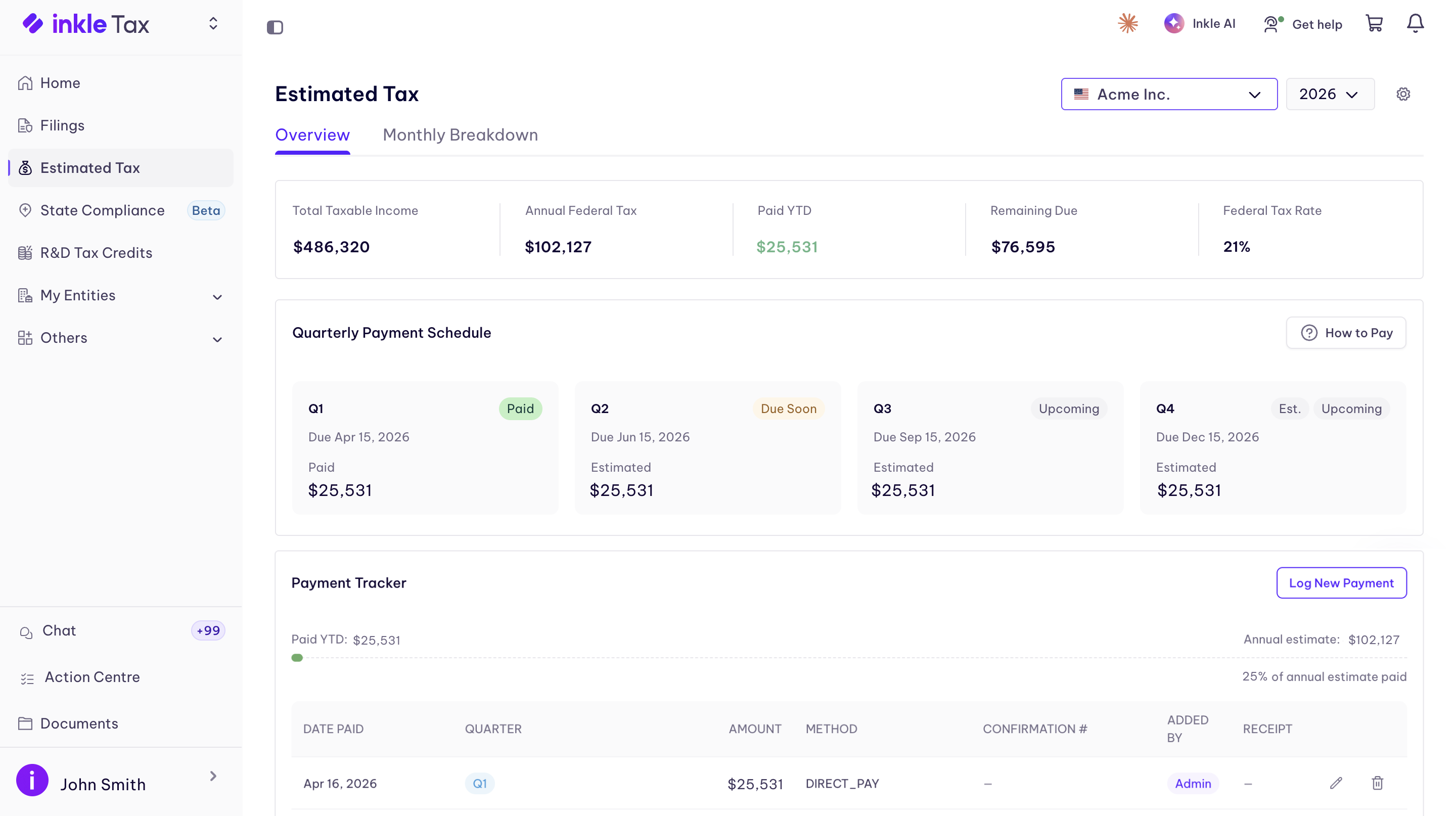
After paying, update your estimated tax dashboard in Inkle so your records stay current.
- Go to Inkle Tax → Estimated Tax.
- Find the quarter you just paid.
- Click Log Payment and enter the payment date, amount, and payment method (EFTPS).
Once logged, your tracker updates to reflect the payment and shows the running status across all four quarters for the year.
Quarterly due dates
Q4 for C-Corps is due in December, not January. The January 15 deadline applies to individuals — corporations have a separate deadline.
How Inkle calculates your payment amount
Inkle pulls your payment amount directly from your financials. There are two ways this works:
- If your books are on Inkle: Your Estimated Tax dashboard automatically projects your quarterly amount from your closed books. Actuals from closed months are used directly; open months are projected forward.
- If you manage your books externally: You can upload your income statement directly to the Estimated Tax dashboard. Inkle will use those numbers to project your quarterly payment amount.
In either case, once the amount is calculated, it appears on your dashboard alongside the due date for that quarter.
What if you miss a payment?
If a quarterly payment is missed or underpaid, the IRS charges an underpayment penalty under §6655. It's calculated daily based on the federal short-term interest rate and applied to the underpaid amount. It's typically a small figure, but avoidable with a little planning.
Inkle sends you an alert before each due date so you have time to schedule the payment before it's too late.
FAQ
When are quarterly estimated tax payments due?
Generally April 15, June 15, September 15, and January 15 of the following year, though C-Corp deadlines can differ slightly. Inkle shows your exact dates in the Estimated Tax tab.
What happens if I miss a quarterly payment?
The IRS charges an underpayment penalty based on how late the payment is and how much was owed.
Do all C-Corps have to pay estimated tax?
Only if you expect to owe $500 or more in tax for the year. Companies with no taxable income typically don't need to.
How is the payment amount calculated?
It's based on your projected annual tax liability, divided across the year using either the current year's estimated income or last year's tax as a safe harbor.
Can I pay estimated tax directly through Inkle?
Yes, once your amount is calculated, you can pay directly from the Estimated Tax tab.
Still have questions?
Reach out to our support team if you have any additional questions regarding filing.