How to Add and Manage Your Cap Table in Inkle Tax
Your cap table is a record of who owns your company, how much they own, and what type of shares they hold. In Inkle Tax, keeping this information accurate is important because it directly affects which filings are created for you and whether your tax returns are correct.
Filling this in properly once will save you a lot of back and forth during filing season.
Why your Cap Table matters for tax compliance
Your cap table is not just an ownership record. Inside Inkle Tax, it is also what the system uses to determine your compliance requirements. Here is what it affects:
- Which forms get generated for you: If 25% or more of your US C-Corp is owned by a foreign person or company, the IRS might require you to file Form 5472 along with your Form 1120. Inkle Tax detects this automatically, but only if your shareholders and their ownership percentages are correctly added.
- Form 5471 obligations: If your US company owns 10% or more of a foreign company, such as an Indian subsidiary, Form 5471 is required. This is determined by the ownership details in your cap table.
- Delaware Franchise Tax calculations: Delaware calculates franchise tax using two methods. The second method, called the Assumed Par Value Capital Method, almost always results in a lower tax bill for funded startups. Inkle uses your share and ownership data to apply the most favorable calculation for you.
- Autofill across filings: Shareholder names, ownership percentages, and share classes saved in your cap table are automatically pulled into tax forms where needed. This reduces manual entry and keeps your filings consistent.
Where to - upload/add your Cap Table in Inkle Tax
Go to My Entities → Select your entity → Overview → Cap Table
This is where you can add and manage all your shareholder information.
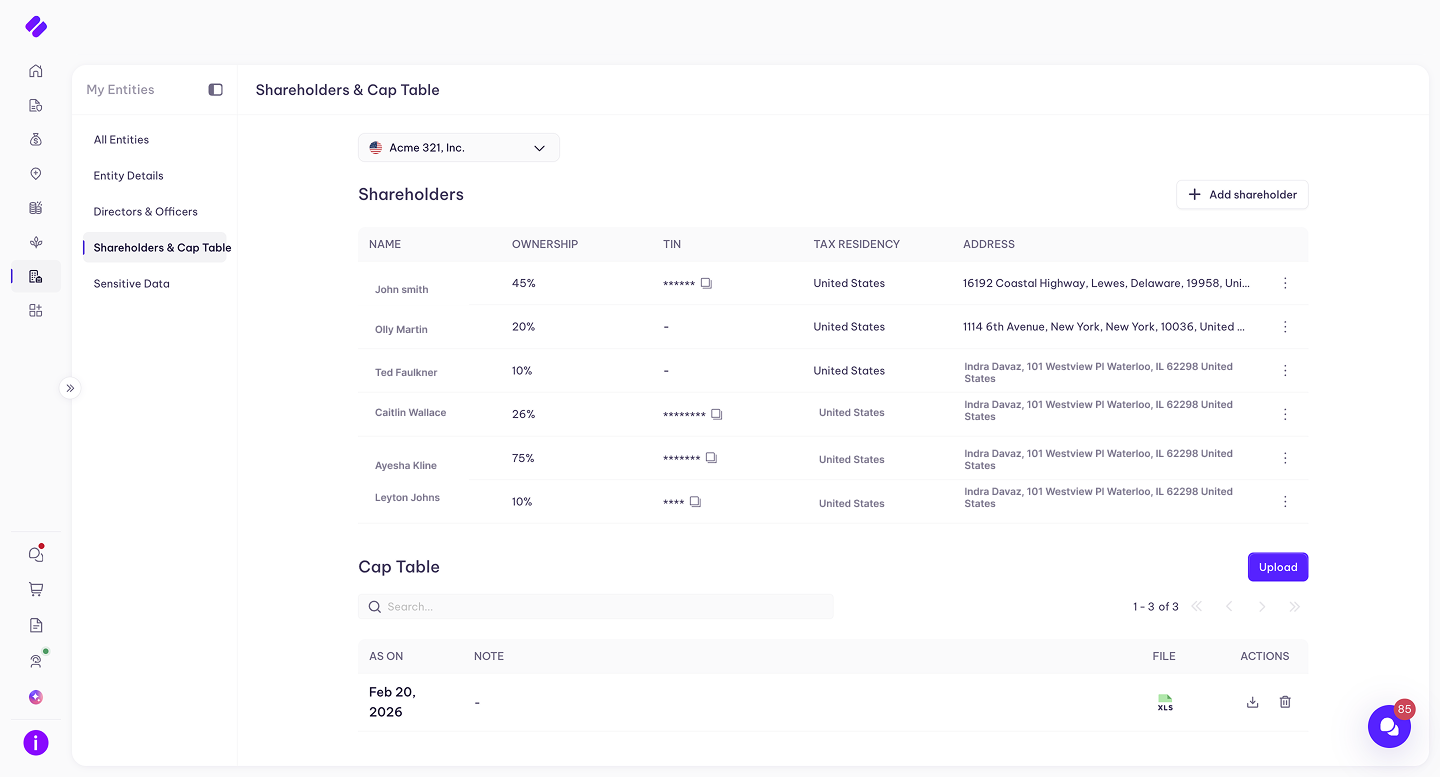
What to fill in for each shareholder
Shareholder Name
Enter the full legal name of each shareholder exactly as it appears on their government-issued ID or incorporation documents. For companies that are shareholders, such as a VC fund or holding entity, use the registered legal name of that company.
Shareholder Type
Select whether each shareholder is an individual or a corporate entity. This matters because the IRS treats individual foreign shareholders and foreign corporate shareholders differently.
- Individual: A founder, angel investor, or employee who holds shares personally
- Corporate entity: A fund, holding company, or parent entity that holds shares as an organization
Persona
Select the persona that best describes the shareholder's role or relationship to the company. For example, this could be a Founder, Investor, or Employee. This helps Inkle Tax categorize shareholders correctly across filings.
TIN (Tax Identification Number)
Enter the shareholder's Tax Identification Number. For US individuals, this is their Social Security Number (SSN) or Individual Taxpayer Identification Number (ITIN). For US companies, this is their Employer Identification Number (EIN). For foreign individuals or entities that do not have a US tax ID, leave this field blank or enter “Foreign”.
Getting this right matters because the IRS uses TINs to match shareholder records across returns. A missing or incorrect TIN can flag your filing for review.
Ownership Percentage
Enter the percentage of the company this shareholder owns. Inkle Tax may calculate this automatically based on shares issued, but always verify it matches your actual cap table. Even a small discrepancy in ownership percentages can affect which forms are generated for you, particularly Form 5472, which is triggered at 25% foreign ownership.
Country and Address
Enter the country of residence for individual shareholders or the country of incorporation for corporate shareholders. Also, provide their mailing address.
A few things to keep in mind here:
- This must be the shareholder's current, active address, not an old or temporary one
- For foreign shareholders, a foreign address is expected and correct here. This is different from your company's mailing address on Form 1120, which must always be a US address.
- The country you select is what Inkle Tax uses to determine whether a shareholder is a foreign person, which directly affects whether Form 5472 is required for your company.
Common situations and how to handle them
- You have a SAFE or convertible note that has not been converted yet: SAFEs and unconverted notes are not equity yet, so SAFE holders do not need to be added as shareholders. If a SAFE converted to shares during the tax year, add that person as a shareholder with their post-conversion share count.
- You have an ESOP pool on your cap table: An ESOP pool represents shares reserved for employee stock options, but unvested or unexercised options are not equity yet. Do not add your ESOP pool as a shareholder. Only add employees or individuals who have fully exercised their options and received actual shares. If options were exercised during the tax year and shares were issued, add those individuals as shareholders with their post-exercise share count.
- Your company is 100% foreign-owned: If all your shareholders are non-US persons or foreign companies, your company is classified as a foreign-owned domestic corporation. This means Form 5472 is required alongside Form 1120. Inkle Tax will generate this filing automatically once your shareholder nationalities are correctly filled in.
- A VC fund is one of your shareholders: Add the fund as a corporate shareholder using its full registered name, for example Sequoia Capital Fund XVIII, L.P. Record the country where the fund is registered. You do not need to list the individual partners inside the fund. The fund entity itself is the shareholder of record.
- Shares were issued or transferred during the year: Record each shareholder's position as of December 31 of each year. If something significant happened during the year, such as a new funding round closing, let your Inkle tax team know via the filing chat. It may affect certain schedules on your return.
- Your US entity owns an Indian subsidiary: If your US company holds shares in an Indian private limited company, this needs to be recorded under your entity structure in Inkle Tax, not just in the cap table. Go to My Entities and make sure the subsidiary relationship is added.
When to update your cap table
You do not need to update your cap table constantly, but it should always reflect the correct position at the end of each tax year before filing season begins. Update it whenever any of the following happen:
- A new funding round closes and new investors receive shares
- An employee exercises stock options and receives shares
- A founder's shares are transferred or bought back
- A SAFE or convertible note converts to equity
- A new entity is added to your company structure
Still have questions?
Reach out to our support team if you have any additional questions about your cap table or how it affects your filings.
Still have questions?
Reach out to our support team if you have any additional questions regarding filing.