How to Redeem Brex Reward Points on Inkle



Inkle has teamed up with Brex to make it easier for businesses to cover their tax, compliance and accounting costs using Brex reward points. If you spend on a Brex card, the points you have already earned can go straight towards your Inkle bill.
Here is a step by step guide to getting started, whether you already have a Brex account or need to open one.
Already have a Brex account? Connect it to Inkle
If you are already a Brex customer with points to redeem, connecting your account takes a moment.
- Open your cart
- Choose “Pay using Brex points/rewards”
- Connect your Brex account
- Pay with your Brex credits
Add the services you want to your cart
Everything on Inkle is paid for through a single cart, so you can pay for tax filings, bookkeeping, Mailroom and sales tax services in one place.
- Open Billing and go to the Products tab. You will see everything available across Inkle Books, Inkle Tax, Inkle Mailroom and Sales Tax. Use the filters at the top if you want to narrow the list to one product.
- Select Add to cart on the service you want. Some services ask for a little more detail first. Filing form 1120, for example, opens a short form where you choose the entity and the period you want covered, then confirm with Add to Cart.
- Select View Cart to review what you have added. The cart shows each item, the period it covers, the rate and your cart total.
- When everything looks right, select Checkout.
Apply your Brex points at checkout
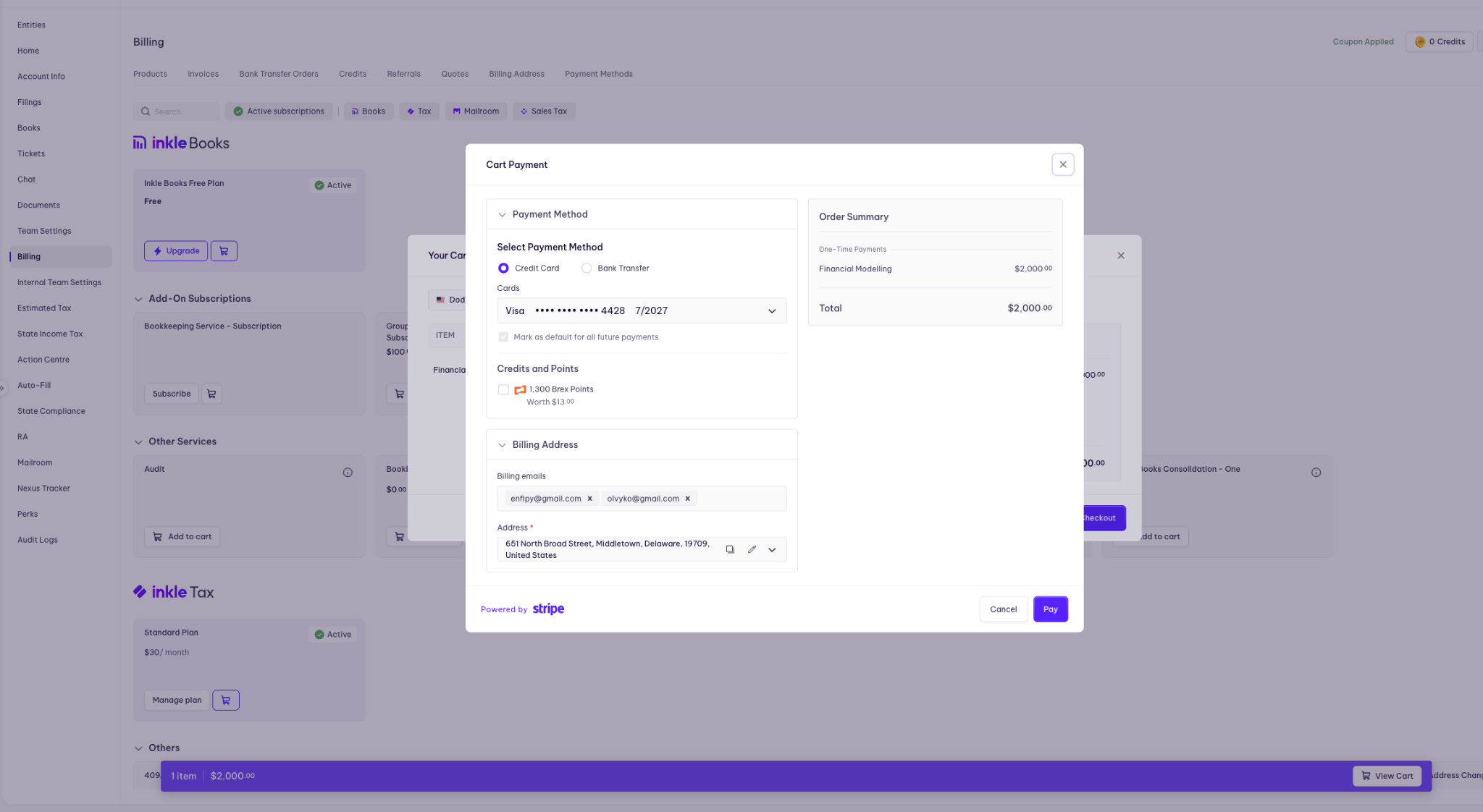
The Cart Payment window has three sections.
Payment Method. Choose between Credit Card and Bank Transfer. If you are paying by card, pick the card you want from the dropdown. You can tick "Mark as default for all future payments" if you would like Inkle to use it going forward.
Credits and Points. This is where your Brex points appear, along with any Inkle credits on your account. You will see your available Brex balance and what it is worth in dollars, for example 1,300 Brex Points worth $13.00. Tick the box to apply them to this payment, and the order summary on the right updates to show what is left to pay.
Billing Address. Confirm the billing emails that should receive the invoice and check the address on file. You can edit it here if needed.
Select Pay to complete the transaction. Payments are processed through Stripe.
What happens next
Your invoice is generated straight away and sent to the billing emails listed at checkout. You can find it any time under the Invoices tab in Billing. The invoice reflects the points applied, so your records show exactly what was covered by rewards and what was paid in cash.
If your payment was for a filing, the filing is launched as soon as payment clears.
New to Brex? Here is how to get started
Setting up an account is straightforward, and Inkle offers additional reward points to get you started.
- Visit the Inkle homepage.
- Click "Apply Now" for a Brex account.
- Inkle sends your application to Brex for approval.
Once Brex confirms, your account is open and you receive an additional 30,000 Brex reward points, worth $300.
Understanding Brex Reward Spending Categories
Brex offers different reward categories depending on the type of card you have. Here are some common categories:
1. Travel: Earn points on flights, hotels, and other travel-related expenses.
2. Restaurants: Get rewards for business meals and dining.
3. Software: Earn points on software subscriptions and services.
4. Ride-sharing: Get rewards for Uber, Lyft, and other transportation services.
5. Advertising: Earn points on digital marketing expenses.
Your exact reward rates may vary, so check your specific Brex card terms for details.
Popular Ways to Use Brex Rewards
While using Brex points for tax filing through Inkle is an excellent option, there are other popular ways to use your rewards:
1. Travel redemptions: Book flights, hotels, and car rentals directly through the Brex travel portal.
2. Statement credits: Apply points to offset charges on your Brex card statement.
3. Gift cards: Redeem points for gift cards from various retailers and restaurants.
4. Cash back: Some Brex cards allow you to redeem points for cash deposited into your Brex Cash account.
5. Transfer to airline partners: Transfer your Brex points to partner airline loyalty programs for potentially higher value redemptions.
Making your points go further
A few ways to build a balance worth redeeming:
- Put all eligible business expenses on your Brex card
- Lean on category bonuses in higher earning categories like travel and software
- Watch for limited-time promotions and bonus offers from Brex
- Take the sign-up bonus if you are new, including the 30,000 points offered through Inkle
- Move team spend onto Brex corporate cards so rewards pool across the company
- Consider a higher tier card if one is available to you, as these often carry better rates
- Clear your balance in full each month so interest does not eat into the value of your rewards
Points applied to essential services like tax filing and bookkeeping free up cash for the areas of your business that need it most. It is a small change to how you pay that adds up over a year.


