How to E-File Form 7004 for a Business Tax Extension in 2026


Missing a business tax deadline can lead to penalties, interest charges, and added compliance work that slows down your finance team. For corporations and partnerships, timely filing is not just about meeting IRS requirements but also about maintaining clean financial records and avoiding last-minute corrections that affect reporting accuracy.
Form 7004 is the standard way businesses request an automatic extension, giving them additional time to file their returns. Today, most businesses prefer e-filing because it is faster, reduces errors, and provides immediate confirmation from the IRS. But what happens if you miss your business tax deadline or file incorrectly at the last minute?
What Is Form 7004? Who Should File It?
Form 7004 is the IRS form used by businesses to request an automatic extension of time to file certain business tax returns. It does not require a detailed explanation or supporting documents. As long as it is filed correctly and before the original deadline, the extension is granted automatically.
.webp)
This form is commonly used by corporations, partnerships, and certain LLCs that need additional time to finalize financials before filing. It is especially relevant for businesses with complex operations, multiple entities, or incomplete bookkeeping at the time of filing.
How Does the Automatic 6-Month Extension Work?
The IRS provides a 6-month extension for most business tax returns when Form 7004 is filed on time. You do not need prior approval or justification. The extension is considered valid as long as the form is complete, accurate, and submitted before the deadline.
However, this extension applies only to filing the return. It does not extend the time to pay taxes owed, which must still be paid by the original due date.
When Should You Use Form 7004 Instead of Form 4868?
Form 7004 is used for business tax returns, while Form 4868 is meant for individual taxpayers. If your business is structured as a corporation, partnership, or multi-member LLC, you must use Form 7004 to request an extension.
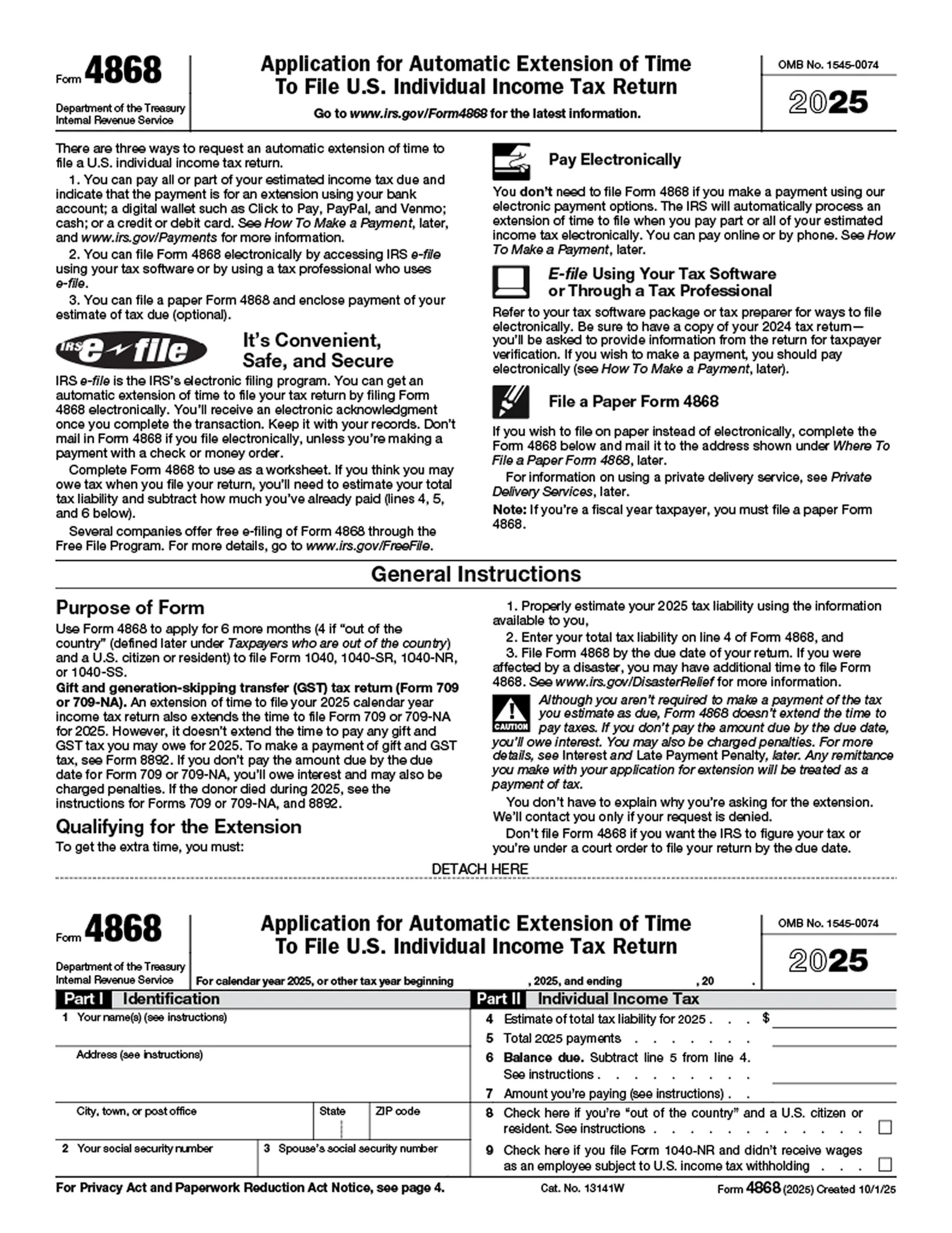
Using the wrong form can lead to rejection or missed deadlines, so it is important to match the extension form with the correct type of taxpayer.
Here are the key cases where Form 7004 applies:
- Businesses filing returns such as Form 1120, 1120-S, or 1065 are eligible to request an extension using Form 7004.
- Different entity types, including C corporations, S corporations, partnerships, and certain LLCs, all fall under this form depending on how they are taxed.
- You need to file Form 7004 when you are unable to complete your business tax return by the original deadline.
- The extension is automatic only if the form is filed correctly and on time; errors or delays can invalidate the request.
What Are the 2026 Deadlines for Filing Form 7004
The deadline to file Form 7004 depends on your business entity type and tax year. Each entity has a fixed original filing date, and the extension moves that deadline forward by six months if filed on time.
Step-by-Step Process to E-File Form 7004
E-filing Form 7004 is usually the fastest and safest way to request a business tax extension. It helps reduce manual errors, gives you a submission record, and provides IRS acknowledgment once the form is accepted. The process is not difficult, but each step needs to be completed carefully.
Step 1: Gather the business information you need before filing
Start by collecting the details required to complete the form accurately. This includes your legal business name, Employer Identification Number (EIN), business address, and the tax year for which you are requesting the extension. You should also have an estimate of your total tax liability ready, because the IRS still expects payment by the original due date even if the return itself is extended.
Step 2: Confirm which tax return you are extending
Before filing Form 7004, make sure you know which business return needs the extension. The form is used for several business return types, including Form 1120 for C corporations, Form 1120-S for S corporations, and Form 1065 for partnerships. This matters because the extension request must match the return your business is required to file.
Step 3: Select the correct IRS form code in Form 7004
Form 7004 asks you to choose the correct code in Part II based on the return you want to extend. This is an important step because selecting the wrong code can lead to rejection or processing issues. If your business is filing Form 1120, 1120-S, or 1065, double-check that the code entered matches that return exactly before you submit.
Step 4: Choose an IRS-authorized e-file provider
Businesses cannot e-file Form 7004 directly through the IRS in the same way individuals might submit certain personal forms. You need to use an IRS-authorized e-file provider or business tax software that supports Form 7004. At this stage, choose a provider that allows business extension filings and gives you a clear acknowledgment once submission is complete.
Step 5: Enter your details and review everything carefully
Once you are inside the platform, enter your business information, return type, and extension details exactly as required. Review the EIN, legal entity name, tax year, and IRS form code closely. Even a small mismatch can create rejection problems near the deadline, so this review step should not be rushed.
Step 6: Submit the form electronically before the deadline
After reviewing the form, submit it electronically through the provider. Filing early is better than waiting until the last minute, since it gives you time to fix any rejection or data issue before the due date passes. The submission date and time matter, so make sure the return is transmitted on or before the original filing deadline.
Step 7: Save the IRS acknowledgment and timestamp
After submission, you should receive an IRS acknowledgment confirming whether the extension request was accepted. Save this confirmation along with the timestamp for your records. It acts as proof that the form was filed on time and can help if there is ever a question about your extension status.
Why Does an Form 7004 Extension Not Give You More Time to Pay Taxes
A common misunderstanding is that filing Form 7004 delays all tax obligations. But the extension only gives you more time to file your return, not to pay the taxes owed. The IRS expects you to estimate and pay your tax liability by the original deadline, even if your return is submitted later.
If you do not pay enough tax by the due date, the IRS may charge interest and penalties on the unpaid amount. This means that filing an extension without making a proper payment can still lead to additional costs, even if your extension request is accepted.
How Do You Estimate Your Tax Liability Accurately
To avoid underpayment, businesses should base their estimate on current financial data rather than rough assumptions. This usually involves reviewing year-to-date financial statements, prior-year tax returns, and any major changes in revenue or expenses.
If your books are not fully updated, even a reasonable estimate can become difficult. This is why many businesses prioritize keeping their financial data current before filing an extension.
What Payment Options Can You Use While E-Filing?
When you file Form 7004, you can pay your estimated taxes using different IRS-supported methods depending on what works best for your business.
- IRS Direct Pay allows you to transfer funds directly from your bank account to the IRS.
- EFTPS (Electronic Federal Tax Payment System) is commonly used by businesses for scheduled and recurring tax payments.
- Card and digital payment options are also available, though they may include processing fees depending on the provider.
How Can Inkle Help You with Form 7004 Filing
Inkle is built for startups and growing businesses that need their financial data to stay accurate and ready for compliance at all times. Instead of treating tax filing as a one-time activity, it helps you maintain clean books throughout the year so extensions and filings become easier to handle.
This is especially useful for teams managing multiple entities or cross-border operations. When financial data is scattered, estimating taxes, filing extensions, and preparing returns all become harder. Inkle reduces that effort by keeping your financial records structured and aligned with US tax requirements from the start.
Here is how Inkle supports your business tax filings:
- It keeps your bookkeeping updated and aligned with your filings, so your financial data is always ready when you need to estimate taxes or file extensions.
- It supports US and India entities, making it easier to manage cross-border operations and reporting requirements.
- It helps you estimate tax liability more accurately by ensuring your financial records are complete and up to date.
- It centralizes compliance tracking, so you do not have to manage multiple deadlines and filings manually.
If your team is spending too much time preparing data before deadlines or fixing issues during tax season, it may be time to improve how your financial workflows are set up.
Book a demo with Inkle to simplify your business tax filings and stay compliant with less effort.
Frequently Asked Questions
How long is the extension period for Form 7004
A standard 6-month extension applies to most business entities if Form 7004 is filed correctly and on time.
Can you e-file Form 7004 for multiple businesses at once
Yes, many e-file providers support batch filing. However, each business must have a separate Form 7004 submission with its own details and acknowledgment.
Does filing Form 7004 delay your tax payment deadline
No, filing Form 7004 only extends the time to file your return. You must still pay estimated taxes by the original deadline to avoid penalties and interest.
What happens if your Form 7004 is rejected near the deadline
If your form is rejected, the IRS usually provides a short correction window called the perfection period. You can fix the errors and resubmit without penalty if it is done within this timeframe.
Which businesses must file Form 7004 instead of Form 4868
Corporations, partnerships, and multi-member LLCs must use Form 7004 for extensions. Form 4868 is only for individual taxpayers.
Do you need software to e-file Form 7004
Yes, businesses must use an IRS-authorized e-file provider or supported tax software to submit Form 7004 electronically. Direct e-filing through the IRS is not available for this form.